In the traditional office, a “Clean Desk” policy was a simple habit: shred the sensitive documents, lock away anything important, and please don’t leave passwords on sticky notes where everyone can see them. Revolutionary stuff, right?
In 2026, the same idea still matters, but the “desk” has changed.
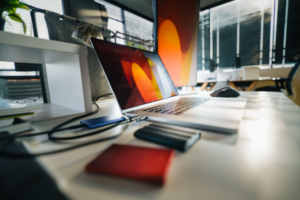
For many teams, the home office is now the default workspace. That means physical access can quickly become digital access. An unlocked screen, a shared device, or a laptop left in the wrong place can expose the same systems your business depends on every day.
Clean Desk 2.0 isn’t about having a spotless desk for the sake of appearances. It’s about securing the bridge between the physical workspace and the digital business.
If a houseguest, delivery person, or thief can sit down at your workstation, they don’t need to be a master hacker to cause real damage. They just need a few unattended minutes and an open session.
For businesses in Brisbane, Mackay, and across Australia, this is where practical IT Support and Managed IT can help turn good habits into clear, enforceable standards.
Why an Unlocked Screen is a Data Breach
Most small business owners treat multi-factor authentication, or MFA, as the ultimate front-door lock. And yes, it’s a very good lock. The problem? Once you’re already inside, the “front door” is no longer the control that matters most.
When you sign into a web app, your browser creates a session token, often stored as a cookie, so you can stay logged in without being challenged on every click.
Kaspersky notes that session hijacking is “sometimes called cookie hijacking” because cookies commonly store the session identifier. Proofpoint says session tokens act like digital “keys.” If they’re stolen, attackers can impersonate legitimate users and bypass authentication measures “like MFA”.
That’s why physical access changes the game.
If someone can sit down at your workstation while you’re making a coffee, they don’t need to “crack” anything. They can reuse your already authenticated session and access the same cloud apps, CRM data, and financial tools you were just using, no MFA prompt required.
Not exactly comforting, is it?
This is exactly why Clean Desk 2.0 needs an auto-lock culture. Set short screen-lock timers. Lock manually every time you step away. Treat an unlocked session the same way you’d treat a set of master keys left in the door.
Good Managed Services can help make this automatic, consistent, and far less dependent on people remembering every single time.
Hardware “Legacy Debt” on Your Desk
Most people keep old tech for the same reason: it still works. But “still works” is not the same as “still safe”.
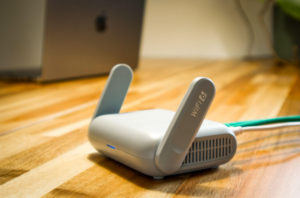
The same legacy debt that shows up in server rooms also shows up in home offices, often in the exact places that matter most, like routers, VPN gateways, and the “backup” laptop that hasn’t been updated in months.
The core problem is end-of-support. When a device reaches end-of-support, or EOS, security fixes stop arriving.
The UK’s guidance on obsolete products notes, “Ideally, once out of date, technology should not be used,” and “the only fully effective way to mitigate this risk is to stop using the obsolete product.”
In other words, you can’t patch your way out of something that no longer gets patches. Handy? No. Important? Absolutely.
This matters even more for edge devices. These are anything internet-facing that sits between your home network and the rest of the world.
A Clean Desk 2.0 habit is to audit your home-office “edge” the same way you’d audit a server room:
Identify what’s internet-facing
Confirm it’s supported and patchable
Retire anything that isn’t.
That old router in the corner might look innocent, but if it hasn’t been updated in years, it could be the weakest link in the chain. This is where Managed IT support helps businesses move from “we think it’s fine” to “we know it’s secure.”
Your Digital Employee Needs a Locked Door
As AI features get embedded into everyday tools, workstations aren’t just “where you work” anymore. They’re where automated actions happen.
An AI agent might update your CRM, draft client communications, schedule appointments, or move a workflow forward with minimal input once it’s been kicked off.
That creates a new physical risk because unattended sessions and automation really don’t mix.
If an agent is running a process while you’re away from your desk, an unlocked screen turns into an open control panel. Someone doesn’t need to be technical to cause damage.
They just need to click, approve, change a destination account, or interfere with an in-flight task. And suddenly, your helpful AI assistant has had a very bad day at work.
The fix isn’t banning automation. It’s treating AI-driven workflows like you’d treat any powerful business system: with clear boundaries and clear approvals.
Decide upfront:
What decisions can the AI agent make without a human present?
What actions require an explicit approval step?
What are its spending limits and escalation rules if money is involved?
Which systems and data are the agents allowed to access, and which are off-limits?
The right IT Support approach helps you keep the benefits of automation while reducing the “oops, who approved that?” moments.
Physical Efficiency and Cloud Waste
A Clean Desk 2.0 mindset isn’t only about security. It’s also about operational discipline: knowing what you’re using, why you’re using it, and what should be switched off when it’s not needed.
Cloud waste is the digital version of leaving the lights on in an empty building. It shows up as underused servers, test environments that never power down, and storage that keeps growing because nobody owns the cleanup.
None of it looks dramatic day to day. It just quietly inflates your monthly bill.
The simple habit that fixes it is the same one that keeps a physical workspace under control: visibility and ownership.
Assign each environment and major resource to an owner, review what’s actually being used, and schedule non-production workloads to shut down outside business hours.
These “tidying” routines don’t just cut spending. They reduce clutter, limit exposure, and make your environment easier to manage when something goes wrong.
With the right Managed Services partner, this becomes a repeatable process instead of a once-a-year clean-up panic.
Building a 2.0 Foundation
Securing your home office from physical data leaks isn’t about paranoia. It’s about professionalism. In 2026, the home workspace isn’t a side setup. It’s part of your business perimeter.
Clean Desk 2.0 is really a set of modern defaults, like locked screens, supported devices, clear AI approvals, and properly managed cloud resources. When those basics are consistent, small home-office lapses stop turning into bigger business problems.
Want help turning this into a simple, enforceable baseline for your team? Contact us for a technology consultation. Whether your business is in Brisbane, Mackay, or supporting people across multiple locations, we’ll help you put practical guardrails in place without making work harder than it needs to be.
With the right IT Support, Managed IT, and Managed Services behind you, Clean Desk 2.0 becomes less about perfect desks and more about confident, secure everyday operations.
—