Ever wondered how secure your business really is? Here’s the scary bit—around 43% of cyberattacks target small businesses. Why? Because hackers know most small businesses aren’t fully locked down when it comes to security.
One of the easiest and most overlooked ways to strengthen your defences? Multi-Factor Authentication (MFA). It adds an extra layer of protection, so even if someone gets your password, they still can’t break in.
In this guide, we’ll walk you through why MFA matters, how it works, and how you can roll it out across your business—without the hassle.
Why Multi-Factor Authentication is a No-Brainer for Small Businesses
Let’s be honest—small businesses often run lean. No big security teams. No massive budgets. That’s why cybercriminals love targeting them.
All it takes is one dodgy password and bam—your customer data, financials, or emails are compromised.
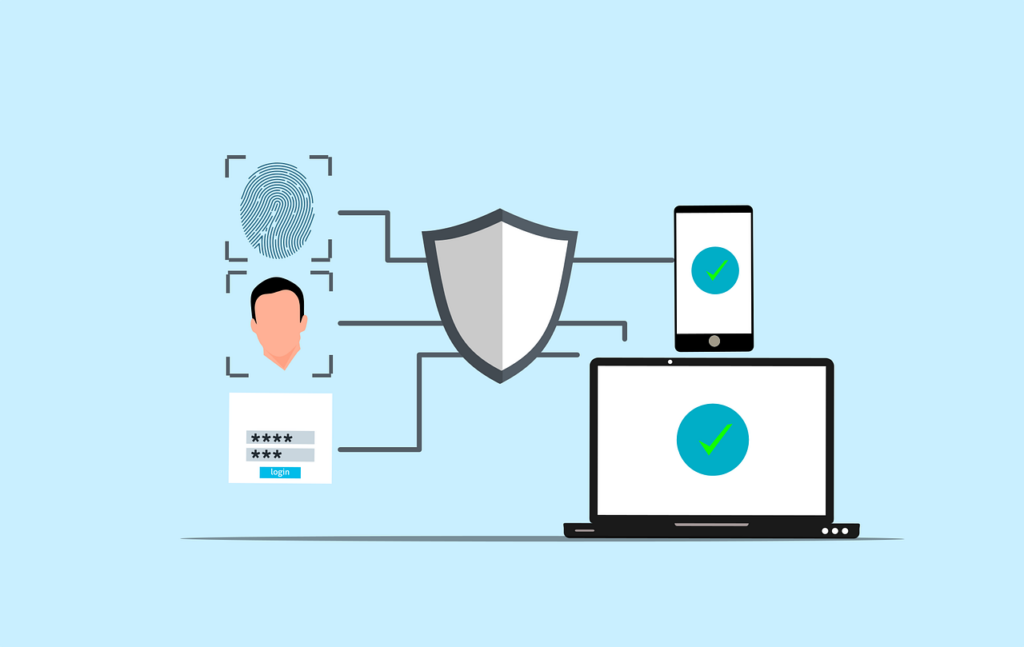
MFA (Multi-Factor Authentication) changes the game. Instead of just relying on a password, MFA asks for something else too—like a time-based code, a fingerprint, or a one-time push notification to your phone.
Even if hackers have your password, MFA makes breaking in a lot harder.
We help businesses across Brisbane and Mackay roll out MFA as part of our Managed IT and cybersecurity support—because it’s one of the easiest wins for security.
What is MFA and How Does It Work?
Think of MFA like locking your front door and setting an alarm. It’s an extra step, sure—but it makes a massive difference.
MFA typically includes two or more of the following:
✅ Something You Know
A password or PIN. Pretty standard, but unfortunately also easy to guess, phish, or steal.
✅ Something You Have
Your phone, a security token, or an app like Google Authenticator that gives you a unique code every 30 seconds.
✅ Something You Are
Biometrics—like a fingerprint, face scan, or voice recognition. Super secure, and nearly impossible to fake.
Combine any two of these, and you’ve instantly made life way harder for hackers.
How to Set Up Multi-Factor Authentication in Your Business
Rolling out MFA across your team sounds more technical than it actually is. Here’s how we usually approach it for small businesses we support:
1. Review Your Current Setup
Start with the essentials:
- Email accounts (especially Outlook or Gmail)
- Cloud platforms (like Microsoft 365 or Google Workspace)
- Banking apps
- CRMs and customer databases
- Remote access tools (for your remote workers)
These are your high-risk areas—secure them first.
2. Pick the Right MFA Tools
You don’t need to spend a fortune. Here are some solid options:
- Google Authenticator: Free, simple, reliable
- Duo Security: Great user experience, good for teams
- Authy: Easy backups and multi-device sync
- Okta: More advanced, great for growing businesses
We can help you figure out what works best for your size and budget.
3. Roll It Out to Your Team
Once your tools are chosen:
- Start with core apps (email, file storage, CRM)
- Make MFA mandatory for all staff
- Set up secure access for remote workers too (we recommend VPN + MFA)
Don’t forget training—some team members might need a little hand-holding.
4. Keep It Maintained
Cybersecurity isn’t a “set and forget” thing. You’ll want to:
- Regularly review who has access to what
- Update methods (e.g. switch from SMS to app-based codes)
- Act fast if someone loses a device or changes phone numbers
Regular testing and audits make sure everything’s still rock-solid.
Common Challenges (And How to Dodge Them)
A few roadblocks we see (and how we help our clients get around them):
😕 “My team doesn’t like change”
Totally normal. Just explain why MFA matters—then offer training and support. Once they see how easy it is, they’re usually on board.
🧩 “Some of our apps don’t support MFA”
We help businesses work around this by picking MFA tools that integrate easily—or using third-party options like Duo or SSO (Single Sign-On).
💸 “We’re on a tight budget”
There are great free tools (like Google Authenticator), and most paid options offer low-cost starter plans. We’ll help you get the most bang for your buck.
📱 “What if someone loses their device?”
It happens. That’s why we set up backup codes, alternate contact methods, or device management policies so you’re never locked out for long.
Now’s the Time to Act
Cyberattacks aren’t just a risk—they’re a reality. And MFA is one of the easiest, most cost-effective ways to protect your business.
If you’ve already got a solid IT Support provider—great. If not, we can help with:
- Reviewing your current setup
- Choosing the right MFA tools
- Training your team
- Monitoring your security going forward
Whether you’re in Brisbane, Mackay, or anywhere else in Australia, we’ve got your back.
Ready to lock things down?
Get in touch today and let’s get your business protected—quickly and painlessly.
—